
Introduction
BGP becomes much easier to understand once routes are allowed to move through an actual network.
In this lab, we’ll build a four-router eBGP topology and follow prefixes as they travel between autonomous systems. Along the way, we’ll observe how BGP neighbors form, how the AS_PATH changes as a route is advertised, and how each router decides which path to use.
The topology is intentionally simple. Each router belongs to its own autonomous system, and all eBGP neighbors are directly connected. This keeps the focus on BGP behavior without introducing an IGP or additional reachability mechanisms.
By the end of the lab, we should be able to look at a BGP route and explain where it came from, how it reached the router, and whether the route is actually usable for forwarding traffic.
What We’ll Prove
By the end of this lab, we should be able to:
- Establish eBGP neighbor relationships between four autonomous systems.
- Advertise locally originated prefixes into BGP.
- Follow a prefix as it moves from one AS to another.
- Observe how the
AS_PATHchanges as routes are re-advertised. - See how BGP uses the
AS_PATHto prevent routing loops. - Verify which BGP path is selected and whether traffic can actually use it.
Network Topology
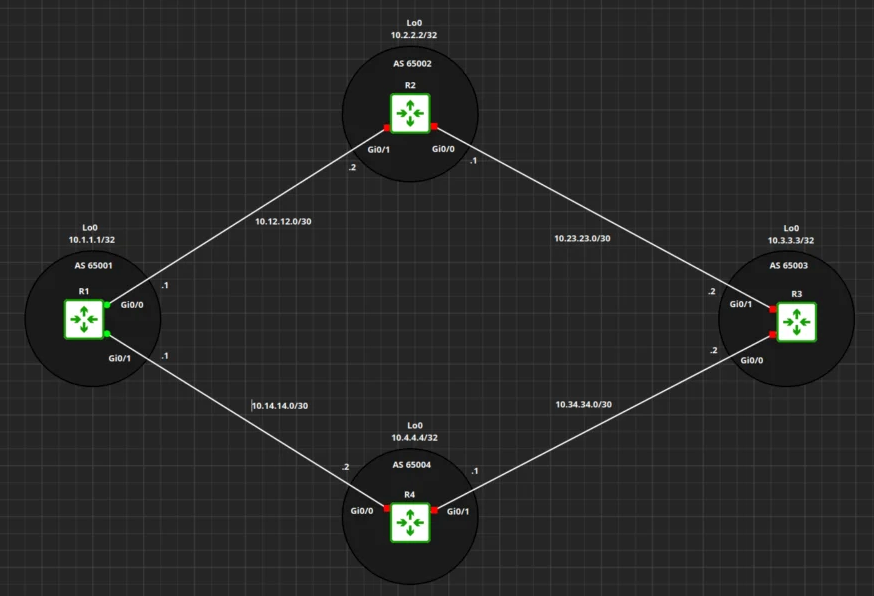
We’ll use four Cisco IOSv routers, with each router placed in its own autonomous system.
The topology forms a diamond, giving R1 two possible BGP paths back toward prefixes originated from AS 65001.
Basic BGP Configuration
Before following any routes through the topology, each router needs its interface addressing and eBGP neighbor relationships in place.
Each router belongs to a separate autonomous system, and all BGP peers are directly connected. No IGP or static routes are required to establish these sessions.
R1 – AS 65001
interface Loopback0
 ip address 10.1.1.1 255.255.255.255
!
interface GigabitEthernet0/0
 ip address 10.12.12.1 255.255.255.252
 no shutdown
!
interface GigabitEthernet0/1
 ip address 10.14.14.1 255.255.255.252
 no shutdown
!
router bgp 65001
 bgp router-id 10.1.1.1
 bgp log-neighbor-changes
 neighbor 10.12.12.2 remote-as 65002
neighbor 10.14.14.2 remote-as 65004R2 – AS 65002
interface Loopback0
 ip address 10.2.2.2 255.255.255.255
!
interface GigabitEthernet0/0
 ip address 10.23.23.1 255.255.255.252
 no shutdown
!
interface GigabitEthernet0/1
 ip address 10.12.12.2 255.255.255.252
 no shutdown
!
router bgp 65002
 bgp router-id 10.2.2.2
 bgp log-neighbor-changes
 neighbor 10.12.12.1 remote-as 65001
neighbor 10.23.23.2 remote-as 65003R3 – AS 65003
interface Loopback0
 ip address 10.3.3.3 255.255.255.255
!
interface GigabitEthernet0/0
 ip address 10.34.34.2 255.255.255.252
 no shutdown
!
interface GigabitEthernet0/1
 ip address 10.23.23.2 255.255.255.252
 no shutdown
!
router bgp 65003
 bgp router-id 10.3.3.3
 bgp log-neighbor-changes
 neighbor 10.23.23.1 remote-as 65002
neighbor 10.34.34.1 remote-as 65004R4 – AS 65004
interface Loopback0
 ip address 10.4.4.4 255.255.255.255
!
interface GigabitEthernet0/0
 ip address 10.14.14.2 255.255.255.252
 no shutdown
!
interface GigabitEthernet0/1
 ip address 10.34.34.1 255.255.255.252
 no shutdown
!
router bgp 65004
 bgp router-id 10.4.4.4
 bgp log-neighbor-changes
 neighbor 10.14.14.1 remote-as 65001
neighbor 10.34.34.2 remote-as 65003There are only a few BGP commands doing the work here.
router bgp <ASN> starts the BGP process using the router’s local autonomous system number.
bgp router-id explicitly defines the router ID rather than relying on IOS to select one automatically.
neighbor <IP> remote-as <ASN> identifies a BGP neighbor and specifies the autonomous system expected on the other side of the session.
At this stage, we have configured BGP neighbors but have not advertised any prefixes into BGP. The loopbacks exist in each router’s routing table, but simply configuring a BGP process does not automatically advertise them.
Verifying eBGP Sessions
R1# show ip bgp summary

BGP router identifier 10.1.1.1, local AS number 65001
BGP table version is 7, main routing table version 7

Neighbor        V           AS MsgRcvd MsgSent   TblVer  InQ OutQ Up/Down  State/PfxRcd
10.12.12.2      4        65002    6301    6294        7    0    0 3d23h           0
10.14.14.2 4 65004 7533 7547 7 0 0 4d17h 0Both sessions are established. Notice that the State/PfxRcd column contains 0 rather than the word Established. Once a Cisco BGP session reaches the Established state, this field displays the number of prefixes received from that neighbor. Right now that number is zero because we haven’t advertised anything yet.
The Lab Platform Update: Beginning with this lab, the environment has been migrated from GNS3 to netlab using the containerlab provider with Docker-based Cisco IOL images. Netlab is now the primary interface for defining and deploying the topology, while containerlab and Docker handle the underlying containers and virtual links. This approach makes the labs faster to deploy, easier to reproduce, and simpler to tear down and rebuild. Unless a specific use case requires otherwise, future labs in this series will use this workflow.
Lab Topology File
If you want to follow along via netlab, the complete topology used for this lab is below.
This file defines the four Cisco IOL routers, their loopbacks, the point-to-point links between each AS, and the eBGP relationships. Netlab uses containerlab as the provider, with Docker running the underlying IOL containers.
Save the file as topology.yml, then start the lab with netlab up.
---
name: lb002

provider: clab

defaults:
  device: iol

  devices:
    iol:
      clab:
        image: vrnetlab/cisco_iol:17.12.01

module: [ bgp ]

bgp:
  advertise_loopback: false

nodes:
  r1:
    loopback.ipv4: 10.1.1.1/32
    bgp.as: 65001

  r2:
    loopback.ipv4: 10.2.2.2/32
    bgp.as: 65002

  r3:
    loopback.ipv4: 10.3.3.3/32
    bgp.as: 65003

  r4:
    loopback.ipv4: 10.4.4.4/32
    bgp.as: 65004

links:
  - r1:
      ipv4: 10.12.12.1/30
    r2:
      ipv4: 10.12.12.2/30

  - r2:
      ipv4: 10.23.23.1/30
    r3:
      ipv4: 10.23.23.2/30

  - r3:
      ipv4: 10.34.34.2/30
    r4:
      ipv4: 10.34.34.1/30

  - r1:
      ipv4: 10.14.14.1/30
    r4:
ipv4: 10.14.14.2/30Start the topology with:
netlab upAdvertising the Loopbacks
Our eBGP sessions are established, but the routers still have no BGP prefixes to exchange.
Each router already has a /32 loopback interface:
R1  10.1.1.1/32
R2  10.2.2.2/32
R3  10.3.3.3/32
R4 10.4.4.4/32We’ll advertise these loopbacks into BGP using the network command.
On IOS XE, the network statement is configured under the IPv4 unicast address family:
R1(config)# router bgp 65001
R1(config-router)# address-family ipv4 unicast
R1(config-router-af)# network 10.1.1.1 mask 255.255.255.255R2(config)# router bgp 65002
R2(config-router)# address-family ipv4 unicast
R2(config-router-af)# network 10.2.2.2 mask 255.255.255.255R3(config)# router bgp 65003
R3(config-router)# address-family ipv4 unicast
R3(config-router-af)# network 10.3.3.3 mask 255.255.255.255R4(config)# router bgp 65004
R4(config-router)# address-family ipv4 unicast
R4(config-router-af)# network 10.4.4.4 mask 255.255.255.255The exact prefix must already exist in the routing table for the BGP network statement to originate it. In this case, each /32 exists because it is configured directly on the router’s Loopback0 interface.
At this point, each router is originating its own loopback into BGP and advertising that prefix to its eBGP neighbors.
As those routes propagate through the topology, each eBGP router adds its own autonomous system number to the AS_PATH before advertising the route onward. This lets us follow where a route originated and which autonomous systems it crossed to reach the local router.
From here, our goal is to observe that behavior directly: how the same prefix can arrive through multiple paths, how the AS_PATH changes as the route crosses AS boundaries, how BGP chooses a best path, and how AS_PATH loop prevention keeps routes from being accepted back into an AS they have already traversed.
Next, we’ll look at the BGP tables and follow one prefix across the topology.
Following 10.1.1.1/32 Across the AS
We’ll start with R1’s loopback, 10.1.1.1/32, and follow how that route appears as it moves across the topology.
On R1, the prefix is locally originated:
R1# show ip bgp 10.1.1.1

BGP routing table entry for 10.1.1.1/32, version 2
Paths: (1 available, best #1, table default)
  Advertised to update-groups:
     1

  Local
    0.0.0.0 from 0.0.0.0 (10.1.1.1)
Origin IGP, metric 0, localpref 100, weight 32768, valid, sourced, local, bestBecause R1 originated the route itself, there is no AS_PATH yet. The route has not crossed an autonomous system boundary.
Now look at R2:
R2# show ip bgp 10.1.1.1

BGP routing table entry for 10.1.1.1/32, version 2
Paths: (2 available, best #2, table default)

  65003 65004 65001
    10.23.23.2 from 10.23.23.2 (10.3.3.3)
      Origin IGP, localpref 100, valid, external

  65001
    10.12.12.1 from 10.12.12.1 (10.1.1.1)
      Origin IGP, metric 0, localpref 100, valid, external, best
R2 has learned two paths to the same prefix.
The direct path from R1 has an AS_PATH of:
65001The alternate path learned from R3 has an AS_PATH of:
65003 65004 65001The rightmost ASN is the originating AS. As the route is advertised between eBGP neighbors, each router prepends its own ASN to the left side of the AS_PATH.
So the alternate advertisement tells us that the route originated in AS 65001, was advertised through AS 65004, then through AS 65003 before reaching R2.
R2 selects the direct path because the AS_PATH is shorter:
65001Two Paths on R3
R3 gives us a more interesting view.
R3# show ip bgp 10.1.1.1

BGP routing table entry for 10.1.1.1/32, version 2
Paths: (2 available, best #2, table default)

  65002 65001
    10.23.23.1 from 10.23.23.1 (10.2.2.2)
      Origin IGP, localpref 100, valid, external

  65004 65001
    10.34.34.1 from 10.34.34.1 (10.4.4.4)
      Origin IGP, localpref 100, valid, external, best
R3 receives the same prefix from two different eBGP neighbors:
via R2: 65002 65001
via R4: 65004 65001Both paths have an AS_PATH length of two.
That means AS_PATH length alone cannot decide the winner. BGP must continue through its best-path selection process until another attribute or tie-breaker separates the two paths.
For now, the important point is simply that BGP can retain multiple valid paths to the same prefix while selecting only one as the best path.
Next, we’ll look at R4 and see how AS_PATH loop prevention affects which routes are even allowed into the BGP table.
AS_PATH Loop Prevention
R4 shows us another important part of eBGP behavior.
When we look at 10.1.1.1/32 on R4, only one path is present:
R4# show ip bgp 10.1.1.1
BGP routing table entry for 10.1.1.1/32, version 2
Paths: (1 available, best #1, table default)
65001
10.14.14.1 from 10.14.14.1 (10.1.1.1)
Origin IGP, metric 0, localpref 100, valid, external, bestAt first, that may seem strange. The physical topology provides another path back toward R1:
R4 -> R3 -> R2 -> R1
So why does R4 not have a second BGP path to 10.1.1.1/32?
The answer is AS_PATH loop prevention.
R3 currently selects its path to 10.1.1.1/32 through R4:
65004 65001If R3 advertises that route back toward R4, R3 prepends its own ASN. The resulting AS_PATH would be:
65003 65004 65001R4 sees its own ASN, 65004, already present in the AS_PATH and rejects the advertisement.
That behavior is one of BGP’s fundamental loop-prevention mechanisms:
An eBGP router rejects a route when its own autonomous system number already appears in the AS_PATH.
This also explains why the physical topology and the BGP table do not always show the same number of possible paths. A physical path may exist, but BGP only keeps routes that were actually advertised and passed its loop-prevention checks.
What We’ve Learned So Far
At this point, we can see several core eBGP behaviors in action:
- Each AS originates its own loopback prefix.
- Routes are advertised from one eBGP neighbor to the next.
- Each AS prepends its ASN as the route crosses an AS boundary.
- A router can learn multiple paths to the same prefix.
- BGP selects one path as best while retaining other valid paths.
- A route containing the local ASN in its AS_PATH is rejected to prevent routing loops.
The next step is to look more closely at how BGP chooses between multiple valid paths when AS_PATH length alone does not produce a winner.
When AS_PATH Length Ties
R3 gives us a good example.
For 10.1.1.1/32, R3 has two valid eBGP paths:
via R2: 65002 65001
via R4: 65004 65001
Both paths have an AS_PATH length of two, so neither can win based on path length alone.
To see why R3 selected the path through R4, IOS XE provides a useful command:
R3# show ip bgp 10.1.1.1 best-path-reasonBGP routing table entry for 10.1.1.1/32, version 2
Paths: (2 available, best #2, table default)
65002 65001
10.23.23.1 from 10.23.23.1 (10.2.2.2)
Origin IGP, localpref 100, valid, external
Best Path Evaluation: Path is younger
65004 65001
10.34.34.1 from 10.34.34.1 (10.4.4.4)
Origin IGP, localpref 100, valid, external, best
Best Path Evaluation: Overall best pathThe key line is:
Best Path Evaluation: Path is youngerThe path through R2 did not lose because of AS_PATH length. The two paths were still tied when BGP reached a later step in the best-path process.
In this case, IOS XE preferred the older eBGP path through R4 and identified the path through R2 as younger.
This gives us one final lesson from this topology: AS_PATH length is important, but it is only one part of BGP best-path selection. When multiple valid paths remain tied, BGP continues evaluating additional attributes and tie-breakers until a best path is chosen.
We’ll leave the full best-path process for the next part.
Wrapping Up
In this lab, we followed routes as they propagated across four autonomous systems and observed several fundamental eBGP behaviors:
- Each AS originated its own loopback prefix.
- AS_PATH grew as routes crossed AS boundaries.
- The same prefix could arrive through multiple paths.
- BGP selected one best path while retaining other valid alternatives.
- AS_PATH loop prevention rejected routes containing the local ASN.
- Equal AS_PATH lengths forced BGP to continue deeper into its best-path selection process.
At this point, we understand how routes move across autonomous systems and how BGP prevents them from looping back into an AS they have already crossed.
The next question is how BGP systematically chooses a winner when multiple valid paths remain.
That is where BGP Foundations Part 3 begins