
Scope
- Establish NETCONF/SSH connectivity to Junos using PyEZ and verify access.
- Use
dev.factsas the primary data source: dump full facts, then produce a five-field summary (Hostname, Model, Serial, Version, Uptime). - Scale the exact same logic from one device → a list of devices (sequential) → concurrent collection with a small thread pool.
- Introduce a concise PyEZ mental model (NETCONF over SSH,
dev.factsdict vs.dev.rpcXML) without deep XML parsing.
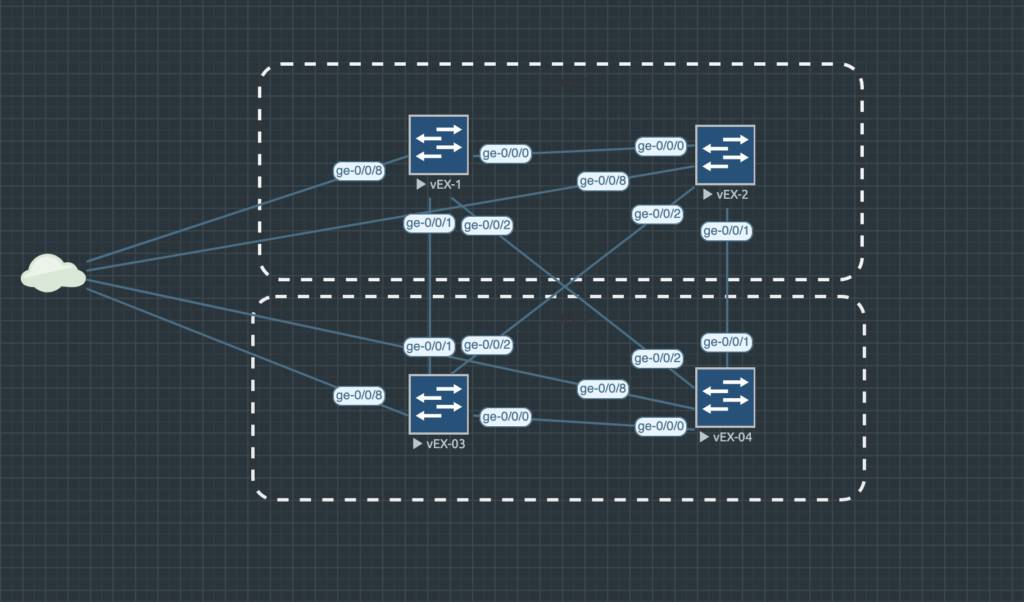
Network Topology
- Devices: vEX-01…vEX-04 in EVE-NG
- Management: ge-0/0/8 on 10.30.0.0/24, gateway 10.30.0.1
- Access: SSH enabled, NETCONF enabled with “set system services netconf ssh”
- Controller: Python 3.9+, PyEZ installed with “pip install jnpr.junos”
What is PyEZ?
- What it is: A Python SDK that talks NETCONF over SSH to Junos and returns structured data (no CLI scraping).
- Two paths used:
dev.facts(cached dict of common facts) anddev.rpc.*(direct RPCs that return XML). - RPC mapping: XML tags map to Python methods (hyphen → underscore), e.g.,
<get-system-uptime-information>→dev.rpc.get_system_uptime_information(); confirm via| display xml rpc. - Session model: Create a
Device, open/close NETCONF (or usewith Device(...)); reads are idempotent and safe to repeat. - Why PyEZ: Consistent across platforms, structured-by-design, easy to serialize/log, and friendly to concurrency for I/O-bound work.
Quick Notes
- “with Device(…):” is a context manager; it opens NETCONF and always closes it on exit.
- Dictionaries are key/value; .get() lets me provide safe defaults when a key isn’t present.
- Exceptions happen a lot with networks (timeouts, auth). Keep try/except simple.
- Serialization: json.dumps(obj, indent=2) turns Python data into readable text for logs and files.
Part I – dev.facts json dump
Purpose: open NETCONF, read dev.facts, print it. This is the very first check.
Code – lb001_dev_facts_dump.py
# lb001_dev_facts_dump.py
from jnpr.junos import Device
import json

HOST = "10.30.0.241"       # edit for lab
USERNAME = "admin"
PASSWORD = "yourpassword"

with Device(host=HOST, user=USERNAME, passwd=PASSWORD) as dev:
    facts = dict(dev.facts)  # FactCache -> plain dict
print(json.dumps(facts, indent=2, default=str))Output:
{
  "current_re": [
    "re0",
    "master",
    "node",
    "fwdd",
    "member",
    "pfem"
  ],
  "domain": null,
  "fqdn": "vEX-01",
  "switch_style": "VLAN_L2NG",
  "HOME": "/root",
  "srx_cluster": null,
  "srx_cluster_id": null,
  "srx_cluster_redundancy_group": null,
  "RE_hw_mi": false,
  "serialnumber": "VM68BB99A1F4",
  "2RE": false,
  "master": "RE0",
  "RE0": {
    "mastership_state": "master",
    "status": "OK",
    "model": "RE-VMX",
    "last_reboot_reason": "Router rebooted after a normal shutdown.",
    "up_time": "1 hour, 45 minutes, 17 seconds"
  },
Quick Notes
- Transport & parsing: NETCONF (XML) runs inside SSH; PyEZ receives XML, parses it, and gives me Python objects.
- First stop: dev.facts is a regular Python dict (not XML). I can print it as JSON for readability.
- Session lifecycle:
with Device(host, user, passwd) as dev:opens NETCONF and always closes it on exit. - Safe printing:
json.dumps(obj, indent=2, default=str)(avoids type errors and keeps output readable). - Keep errors simple at first; if something fails I want the exception to show while I lab.
- Reads are idempotent: facts/RPC “get” calls don’t change the box; safe to run repeatedly.
About XML/RPCs
Junos exposes data as RPCs that return XML. PyEZ calls several of these behind the scenes and builds dev.facts. If/when I need to see the source, I’ll call the specific RPC (e.g., uptime or chassis inventory) and pretty-print the XML
Part 2 – Extract a Minimal Subset
Task
Produce a five-field summary from dev.facts: Hostname, Model, Serial, Version, Uptime.
Inputs
- One reachable Junos device (NETCONF/SSH enabled)
- IP/Credentials
Procedure
- Open a NETCONF session with
Device(...). - Read
dev.factsand convert to a plain dict. - Build a summary with simple fallbacks (
serialnumber|serial,RE0.up_time|uptime). - Print results in a clean, predictable format.
Code – lb001_facts_subset.py
# lb001_facts_subset.py
# Purpose: connect to one Junos device with PyEZ and print five useful facts.
# Usage:
#   1) pip install jnpr.junos
#   2) Edit HOST, USERNAME, PASSWORD
#   3) python lb001_facts_subset.py

from jnpr.junos import Device

# --- edit for your lab ---
HOST = "10.30.0.241"
USERNAME = "admin"
PASSWORD = "yourpassword"

try:
    # Open NETCONF; session auto-closes when the block ends
    with Device(host=HOST, user=USERNAME, passwd=PASSWORD) as dev:
        f = dict(dev.facts)  # make it a plain dict for easy access

        # Build a tiny summary using simple fallbacks where platforms differ
        hostname = f.get("hostname", "N/A")
        model    = f.get("model", "N/A")
        serial   = f.get("serialnumber") or f.get("serial", "N/A")
        version  = f.get("version", "N/A")
        uptime   = (f.get("RE0", {}) or {}).get("up_time") or f.get("uptime", "N/A")

        print(f"\nDevice: {HOST}")
        print(f"  Hostname : {hostname}")
        print(f"  Model    : {model}")
        print(f"  Serial   : {serial}")
        print(f"  Version  : {version}")
        print(f"  Uptime   : {uptime}")

except Exception as e:
    # Keep errors straightforward in the first lesson
    print(f"[error] {HOST}: {e}")
Output
Device: 10.30.0.241
  Hostname : vEX-01
  Model    : EX9214
  Serial   : VM68BB99A1F4
  Version  : 24.4R1.9
  Uptime   : 1 hour, 45 minutes, 17 seconds
Quick Notes
hostname→ device host namemodel→ platform familyserialnumber | serial→ chassis serialversion→ Junos version stringRE0.up_time | uptime→ human-readable uptime
Verification Checklist
- Can SSH to the device with same creds.
- NETCONF is enabled:
set system services netconf ssh→commit. - No XML parsing here –
dev.factsis already a Python dict.
Part 3 – Read dev.facts from multiple devices
Task
Gather the same five-field summary (Hostname, Model, Serial, Version, Uptime) from four devices using a simple Python list and a straight loop (no concurrency yet).
Inputs
- Devices reachable at 10.30.0.241–.244 with NETCONF over SSH enabled.
- One username/password with read access.
Procedure
- Define a Python list of device IPs.
- Loop over the list; for each IP, open a NETCONF session with
Device(...). - Read
dev.facts, build the five-field summary with basic fallbacks, print. - Catch exceptions per device so one failure doesn’t stop the loop.
Code – lb001_facts_multi.py
# lb001_facts_multi.py
# Purpose: read dev.facts from multiple devices (sequential loop) and print a short summary for each.
from jnpr.junos import Device
HOSTS = ["10.30.0.241", "10.30.0.242", "10.30.0.243", "10.30.0.244"]
USERNAME = "admin"
PASSWORD = "yourpassword"
def summarize(facts: dict) -> dict:
"""Return the five-field summary with simple, portable fallbacks."""
return {
"Hostname": facts.get("hostname", "N/A"),
"Model": facts.get("model", "N/A"),
"Serial": facts.get("serialnumber") or facts.get("serial", "N/A"),
"Version": facts.get("version", "N/A"),
"Uptime": facts.get("RE0", {}).get("up_time") or facts.get("uptime", "N/A"),
}
for ip in HOSTS:
try:
with Device(host=ip, user=USERNAME, passwd=PASSWORD) as dev:
f = dict(dev.facts)
s = summarize(f)
print(f"\nDevice: {ip}")
for k, v in s.items():
print(f" {k}: {v}")
except Exception as e:
# Keep going even if one device fails
print(f"[error] {ip}: {e}")
Output
Device: 10.30.0.241
  Hostname : vEX-01
  Model    : EX9214
  Serial   : VM68BB99A1F4
  Version  : 24.4R1.9
  Uptime   : 1 hour, 45 minutes, 17 seconds
Device: 10.30.0.242
Hostname : vEX-02
Model : EX9214
Serial : VM...
Version : 24.4R1.9
Uptime : 1 hour, 42 minutes, 03 seconds
...Code Breakdown / Notes
- Python list (
HOSTS)- An ordered collection. Iteration preserves order, so output blocks appear in the same order as the list.
- Easy to swap in different sets (lab vs. prod) without changing logic.
forloop overHOSTS- Executes the same steps for each device: open session → read facts → print summary.
- Control flow is sequential; each iteration finishes before the next begins.
- Context manager inside the loop (
with Device(...) as dev)- Opens a NETCONF session for that device and guarantees it closes at the end of the iteration, even on errors.
- Prevents session leaks when iterating over many devices.
- Per-device
try/except- Errors are isolated to the failing IP; the loop continues to the next device.
- This is critical in network automation – partial success is still useful.
- Small, pure helper (
summarize)- A “pure function”: input facts dict → output summary dict, no side effects.
- Makes the loop readable and testable; you can unit-test
summarizewith a mocked facts dict.
- Portability fallbacks in
summarizeserialnumber | serial,RE0.up_time | uptimecover common platform differences without extra conditionals.
- Performance model (sequential, I/O-bound)
- Total runtime ≈ sum of individual device times (
T_total ≈ t1 + t2 + t3 + t4). - Good baseline for correctness; we’ll improve wall-clock time with concurrency next while keeping the same output format.
- Total runtime ≈ sum of individual device times (
Part 4 – Concurrent facts(ThreadPoolExecutor + as_compelted)
Task
Gather the same five-field summary (Hostname, Model, Serial, Version, Uptime) from multiple devices concurrently using Python threads. Keep output format identical to Part 3 so results are comparable.
Inputs
- Devices reachable at 10.30.0.241–.244 with NETCONF over SSH enabled.
- One username/password with read access.
Procedure
- Reuse the exact
summarize_factshelper from Part 3 (same five fields, same fallbacks). - Write a worker that connects to one device and returns three things:
(ip, summary_dict_or_None, error_message_or_None). - Create a
ThreadPoolExecutorwith a small, sensiblemax_workers(e.g.,min(8, len(HOSTS))). - Submit one worker per IP; keep the returned Future objects in a list.
- Iterate
as_completed(futures)and print each device’s summary as soon as its Future finishes (fastest-first). - If a worker returns an error string, print a one-line
[error] <ip>: <reason>and continue.
Code – lb001_facts_concurrent.py
# lb001_facts_concurrent.py
# Purpose: read dev.facts from multiple devices concurrently (threads) and print a short summary for each.

from concurrent.futures import ThreadPoolExecutor, as_completed
from jnpr.junos import Device

HOSTS = ["10.30.0.241", "10.30.0.242", "10.30.0.243", "10.30.0.244"]
USERNAME = "admin"
PASSWORD = "yourpassword"

def summarize(facts: dict) -> dict:
    """Return the five-field summary with simple, portable fallbacks."""
    return {
        "Hostname": facts.get("hostname", "N/A"),
        "Model":    facts.get("model", "N/A"),
        "Serial":   facts.get("serialnumber") or facts.get("serial", "N/A"),
        "Version":  facts.get("version", "N/A"),
        "Uptime":   facts.get("RE0", {}).get("up_time") or facts.get("uptime", "N/A"),
    }

def fetch_summary(ip: str) -> tuple[str, dict | None, str | None]:
    """
    Worker: connect to 'ip', read dev.facts, return (ip, summary, error).
    Catch exceptions here so the main thread stays clean.
    """
    try:
        with Device(host=ip, user=USERNAME, passwd=PASSWORD) as dev:
            f = dict(dev.facts)
            return ip, summarize(f), None
    except Exception as e:
        return ip, None, str(e)

max_workers = min(8, len(HOSTS))  # sensible cap for small labs

with ThreadPoolExecutor(max_workers=max_workers) as pool:
    futures = [pool.submit(fetch_summary, ip) for ip in HOSTS]

    # Print each result as soon as it's ready (fastest-first)
    for fut in as_completed(futures):
        ip, summary, err = fut.result()
        if err:
            print(f"[error] {ip}: {err}")
            continue

        print(f"\nDevice: {ip}")
        for k, v in summary.items():
            print(f"  {k}: {v}")
Output
Device: 10.30.0.243
  Hostname : vEX-03
  Model    : EX9214
  Serial   : VM...
  Version  : 24.4R1.9
  Uptime   : 1 hour, 52 minutes, 11 seconds

Device: 10.30.0.241
  Hostname : vEX-01
  Model    : EX9214
  Serial   : VM...
  Version  : 24.4R1.9
  Uptime   : 1 hour, 55 minutes, 03 seconds
...Code Breakdown / Notes
- I/O-bound concurrency with threads
- NETCONF calls spend most of their time waiting on network I/O. Threads overlap that waiting, reducing wall-clock time.
- Python’s GIL is not a blocker here because we’re not CPU-bound.
- Thread pool (executor)
ThreadPoolExecutorcreates a small pool of worker threads and schedules tasks for you.- Keep
max_workersreasonable to avoid oversubscribing device control planes (lab default: up to 8).
- Futures and
as_completed- Submitting a worker returns a Future, which represents a result that will arrive later.
as_completed(futures)yields each Future when it finishes (fastest-first), so output starts immediately instead of waiting for the slowest device.
- Worker signature and isolation
- Worker returns a tuple
(ip, summary, error)so the caller can handle success/failure uniformly. - Exceptions are caught inside the worker; one failing device doesn’t stop the run.
- Worker returns a tuple
- Resource management per device
- The worker uses
with Device(...):so each NETCONF session opens and closes cleanly inside its own thread.
- The worker uses
- Naming for readability
- Use descriptive names:
gather_facts_for_device,summarize_facts,completed_future.
- Use descriptive names:
- Output schema remains identical to Part 3
- Same five fields, same formatting. This makes concurrency a drop-in speed improvement without changing downstream expectations.