
After years of building network labs in EVE-NG and GNS3, I finally decided to give Netlab and Containerlab a proper try.
I first came across Suresh Vinasiththamby’s excellent post, Netlab – The Fastest Way to Build Network Labs, and it was enough to convince me to see what the workflow looked like for myself.
Right now I’m working in Antarctica, and a lot of my study time outside of work has been spent building labs to keep my networking skills sharp. Normally I rely heavily on GNS3, but I had to leave my larger lab server back home, so at the moment I’m working with a much smaller hardware footprint.
That made Netlab especially interesting.
Instead of spending time repeatedly creating routers, wiring interfaces, assigning IP addresses, configuring loopbacks, and building the same routing baseline, Netlab lets us describe the topology we want and automate much of that repetitive setup.
The goal is not to automate away the networking. It is to get to the part of the lab we actually want to study faster.
Suresh’s guide uses Ubuntu 22.04 and is a great reference if that is what you are running. For this walkthrough, I’m using Ubuntu 24.04.04 LTS, so I’ll show the exact steps that worked for me on that release.
I also ran into a couple of issues along the way that were not immediately obvious, so I’ll include those here rather than just showing the happy path.
Lab Environment
Everything in this post is running directly on my laptop:
- OS: Ubuntu 24.04.04 LTS
- System: Dell XPS 13 7390
- CPU: Intel Core i7-1065G7, 8 logical CPUs
- Memory: 16 GB RAM
- Storage: 512 GB
It is not a dedicated lab server, which is part of what makes this setup useful for me right now. We will start with a small four-node Arista cEOS topology and see how far a lightweight, container-based workflow can take us.
How the Pieces Fit Together
Before getting into the install, it helps to understand what each part of the stack is doing.
For this setup we are using four main components:
- Netlab — defines the topology, addressing, device types, and protocol modules
- Containerlab — creates the actual lab topology and connects the interfaces
- Docker — runs the network operating system containers
- Ansible — pushes the generated configuration to the devices
Netlab is essentially the piece tying everything together.
Instead of manually creating four routers, connecting each link, assigning IP addresses, configuring loopbacks, and then enabling OSPF, we can describe what we want in a small YAML file and let Netlab build the baseline for us.
The nice part is that it is not completely hidden behind the automation either. Netlab generates the Containerlab topology, Ansible inventory, host variables, and per-device configuration files, so you can still dig into what it created if you want to understand exactly what is happening.
That was one of the things that sold me on the workflow. I still want to see and understand the networking underneath it, I just do not necessarily want to build the same base configuration by hand every time.
Installing Netlab on Ubuntu 24.04
With the pieces out of the way, we can start building the environment.
The first thing I did was update the local APT package index:
sudo apt updateThen install the Python packages we need:
sudo apt install -y python3-pip python3-venvOn Ubuntu 22.04, you may see guides install Netlab directly with:
pip install networklabOn Ubuntu 24.04, running that against the system Python will likely return:
error: externally-managed-environmentUbuntu is protecting its system-managed Python environment, so rather than overriding that behavior, I decided to give Netlab its own Python virtual environment.
python3 -m venv --system-site-packages ~/netlab-venvActivate it:
source ~/netlab-venv/bin/activateYour shell prompt should now show the active environment:
(netlab-venv) pando@conf-t:~$From here, install Netlab normally:
pip install networklabThen verify the installation:
netlab versionOn my system this returned:
netlab version 26.08 executable location: /home/pando/netlab-venv/bin/netlab
package location: ['/home/pando/netlab-venv/lib/python3.12/site-packages/netsim']The important part is that netlab is now running from inside our virtual environment rather than modifying Ubuntu’s system Python installation.
You can double-check that with:
which python
which pip
which netlabMine returned:
/home/pando/netlab-venv/bin/python
/home/pando/netlab-venv/bin/pip
/home/pando/netlab-venv/bin/netlabFrom this point forward, whenever I want to work with Netlab I first activate the environment:
source ~/netlab-venv/bin/activateThat keeps the Netlab tooling separate while still letting Docker, Containerlab, and the rest of the host operate normally.
Installing the Supporting Tools
Netlab itself is only part of the setup. We still need the supporting Ubuntu packages, Ansible, Docker, and Containerlab.
Netlab includes installation helpers for all of these, which makes this part pretty painless.
I ran each installer separately so it was easier to see exactly what was happening and troubleshoot anything that failed.
Install the Ubuntu Prerequisites
With the virtual environment still active:
netlab install ubuntuNetlab will explain what it is about to install and ask for confirmation:
Are you sure you want to proceed [y/n]:

Enter: yThis installs the Ubuntu packages Netlab expects along with a handful of useful tools and development libraries.
Once complete, you should see:
DONE Completed Mandatory and nice-to have Debian/Ubuntu packages installationInstall Ansible
netlab install ansibleThis is one of the reasons we created the Python virtual environment earlier.
Netlab should recognize it automatically:
[INFO] You're running netlab in a Python virtual environment [HINT] Python libraries will be installed in the same environmentContinue with the installation and Netlab will install Ansible along with the Python libraries it uses for device configuration and connectivity.
On my system the final versions were:
ansible: 11.10.0
ansible-core: 2.18.19
ansible-pylibssh: 1.4.0A quick verification is:
netlab version
ansible --versionNetlab should now list the Ansible components instead of showing them as missing.
You can also verify that Python can see Ansible:
python -c "import ansible; print(ansible.__version__)"Mine returned:
2.18.19Install Docker and Containerlab
Finally:
netlab install containerlabThis installs Docker and Containerlab along with the packages required to run them.
Again, confirm when prompted:
Are you sure you want to proceed [y/n]: yWhen the installation finishes, Netlab provides two useful reminders:
* Log out and back in to start using netlab with containerlab/Docker
* Use 'netlab test clab' command to test your installationAt this point I logged completely out of Ubuntu and back in.
Once you log back in, remember that your Python virtual environment will no longer be active. Re-enable it before continuing:
source ~/netlab-venv/bin/activateCheck Your Docker Permissions
Before doing anything else, check your group membership:
groupsYour user needs permission to access Docker without running every command with sudo.
I actually ran into an issue here. Even after logging out and back in, my account was not showing the expected Docker and Containerlab group memberships.
If that happens, make sure your user belongs to both groups:
sudo usermod -aG docker $USER
sudo usermod -aG clab_admins $USERYou can then log out and back in again, or refresh the group membership in your current shell:
newgrp docker newgrp
clab_adminsRun:
groupsagain and verify that you see:
docker
clab_adminsFinally, test Docker access:
docker psAn empty table is completely fine at this point. It simply means Docker is working and there are no containers running yet.
Importing Arista cEOS
With Netlab, Ansible, Docker, and Containerlab working, the next thing we need is a network operating system image.
For this first lab, I’m using Arista cEOS 4.36.2F.
After downloading the cEOS image, I placed the file on my Desktop:
cEOS-lab-4.36.2F.tar.xzDocker cannot use that archive directly, so we first need to import it and assign it a local image name and tag.
From the directory containing the image:
cd ~/DesktopImport it into Docker:
docker import cEOS-lab-4.36.2F.tar.xz ceos:4.36.2The command will take a little while depending on your system. When mine finished, Docker returned the image SHA.
Now verify that Docker has the image:
docker imageOn my system:
IMAGE       ID             DISK USAGE    CONTENT SIZE
ceos:4.36.2 5534ae42226b 3.55GB 976MBAt this point Docker has our cEOS image, but there still should not be any running containers:
Building Our First Topology
With cEOS imported, we can finally get to the interesting part: defining the lab.
For organization, I keep my actual lab files separate from the Python virtual environment. My Netlab environment lives under ~/netlab-venv, while the labs themselves live under ~/netlab-labs.
Inside the first lab directory, create a file named topology.yml.
For this walkthrough, we’ll use a four-router diamond instead of a straight line:
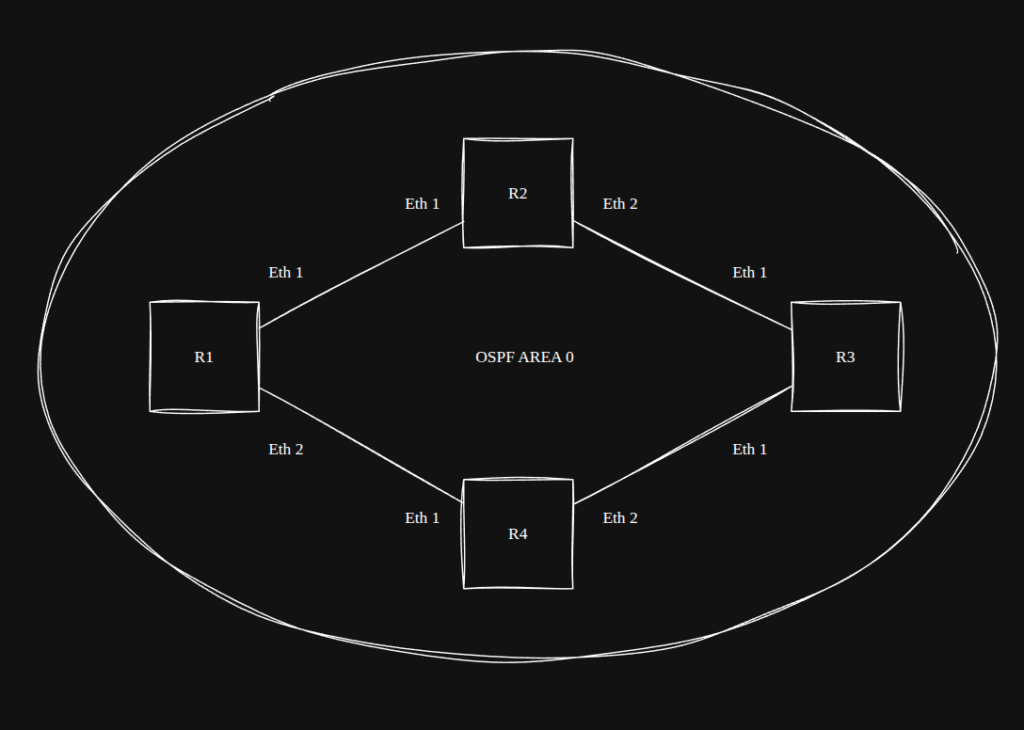
The topology file is still very small:
provider: clab

defaults.device: eos
defaults.devices.eos.clab.image: ceos:4.36.2

module: [ ospf ]

nodes: [r1, r2, r3, r4]

links: - r1-r2 - r2-r3 - r1-r4 - r4-r3There is a lot happening in just a few lines.
provider: clab tells Netlab to use Containerlab as the provider, while:
defaults.device: eos
defaults.devices.eos.clab.image: ceos:4.36.2sets Arista EOS as the default device type and points Netlab to the local cEOS image we imported earlier.
The actual topology is described with:
nodes: [r1, r2, r3, r4]
links:
- r1-r2
- r2-r3
- r1-r4
- r4-r3And this line:
module: [ ospf ]tells Netlab to include OSPF in the generated configuration.
At this point we have not manually assigned interface addresses, created loopbacks, or configured OSPF on any router. We have simply described the topology and the protocol we want to run.
Bring the lab up with:
netlab upNetlab will generate the supporting Containerlab and Ansible files, start the cEOS containers, wait for the devices to become reachable, and then push the generated configurations.
On my test run, all four nodes came up successfully and the deployment finished with:
[SUCCESS] Lab devices configuredFrom there, we can check the lab with:
netlab statusand connect directly to a router with:
netlab connect r1On r1, LLDP confirmed the diamond exactly as expected:
Port Neighbor Device ID Neighbor Port ID TTL
---- ------------------ ---------------- ---
Et1 r2 Ethernet1 120
Et2 r4 Ethernet1 120And the routing table already showed two equal-cost OSPF paths toward r3‘s loopback:
O 10.0.0.3/32 [110/30]
via 10.1.0.2, Ethernet1
via 10.1.0.10, Ethernet2That is exactly what we wanted from the diamond: two valid paths through the topology without manually building any of the underlying configuration.
Before we use this as the baseline for future labs, though, I want to clean up the addressing so management, loopbacks, and point-to-point links are easier to recognize at a glance.
Cleaning Up the Addressing
The default addressing works fine, but I wanted something a little easier to recognize when looking through routing tables, packet captures, and configs.
For this lab, I’m going to separate the address space by purpose:
10.250.0.0/24 Management
10.255.0.0/24 Loopbacks
10.20.0.0/16 Point-to-point linksFor the routed links, I’m also using /31s instead of /30s. Since these are true point-to-point links, there is no need to burn four addresses per subnet.
We can define all of this directly in topology.yml:
provider: clab
defaults.device: eos
defaults.devices.eos.clab.image: ceos:4.36.2
addressing:
mgmt:
ipv4: 10.250.0.0/24
loopback:
ipv4: 10.255.0.0/24
p2p:
ipv4: 10.20.0.0/16
prefix: 31
module: [ ospf ]
nodes: [r1, r2, r3, r4]

links:
  - r1-r2
  - r2-r3
  - r1-r4
- r4-r3Rebuild the lab:
netlab down
netlab upThen verify:
netlab statusOutput:
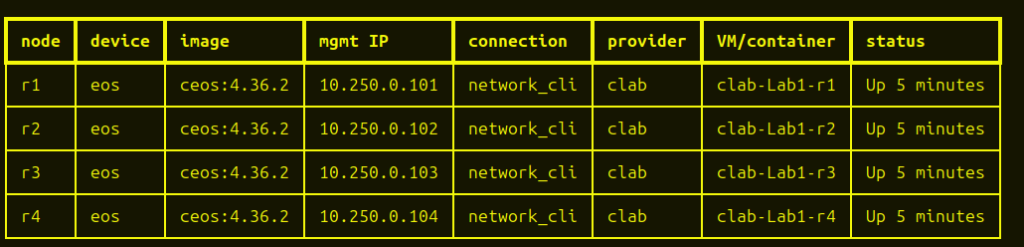
And if you want to confirm the interface addressing directly:
netlab connect r1r1#show lldp neighbors
Port Neighbor Device ID Neighbor Port ID TTL
---- ------------------ ---------------- ---
Et1  r2                 Ethernet1        120
Et2  r4                 Ethernet1        120
r1#show ip interface brief
Address
Interface IP Address Status Protocol MTU Owner
----------------- --------------------- ------------ -------------- ----------- -------
Ethernet1 10.20.0.0/31 up up 1500
Ethernet2 10.20.0.4/31 up up 1500
Loopback0 10.255.0.1/32 up up 65535
Management0 10.250.0.101/24 up up 1500
r1#show ip route ospf
VRF: default
O 10.20.0.2/31 [110/20]
via 10.20.0.1, Ethernet1
O 10.20.0.6/31 [110/20]
via 10.20.0.5, Ethernet2
O 10.255.0.2/32 [110/20]
via 10.20.0.1, Ethernet1
O 10.255.0.3/32 [110/30]
via 10.20.0.1, Ethernet1
via 10.20.0.5, Ethernet2
O 10.255.0.4/32 [110/20]
via 10.20.0.5, Ethernet2
Wrapping Up
At this point, the core setup is complete:
- Netlab is running inside a dedicated Python virtual environment
- Ansible is available to Netlab without the earlier import warning
- Docker and Containerlab are working
- cEOS is imported locally
- The four-router diamond topology builds successfully
- Netlab is generating addressing and OSPF configuration automatically
A few commands are worth keeping handy:
source ~/netlab-venv/bin/activatenetlab up
netlab status
netlab connect r1
netlab downAnd if you want to see all active lab instances:
netlab status --allFor me, the biggest takeaway was how quickly Netlab gets you from a small YAML file to a usable topology. I’m still early in using it, but it already feels like a good fit for the kind of repeatable routing labs I want to build without spending time recreating the same base configuration every time.
This first lab was intentionally simple. From here, I’ll be using the same setup for more involved BGP, OSPF, and eventually multi-vendor labs.